Track your blood pressure and actually understand it
Type the numbers from your cuff and Pulse Tracker does the rest: instant classification, systolic and diastolic trends, reminders, Apple Health sync and plain-language explanations of what each stage means.
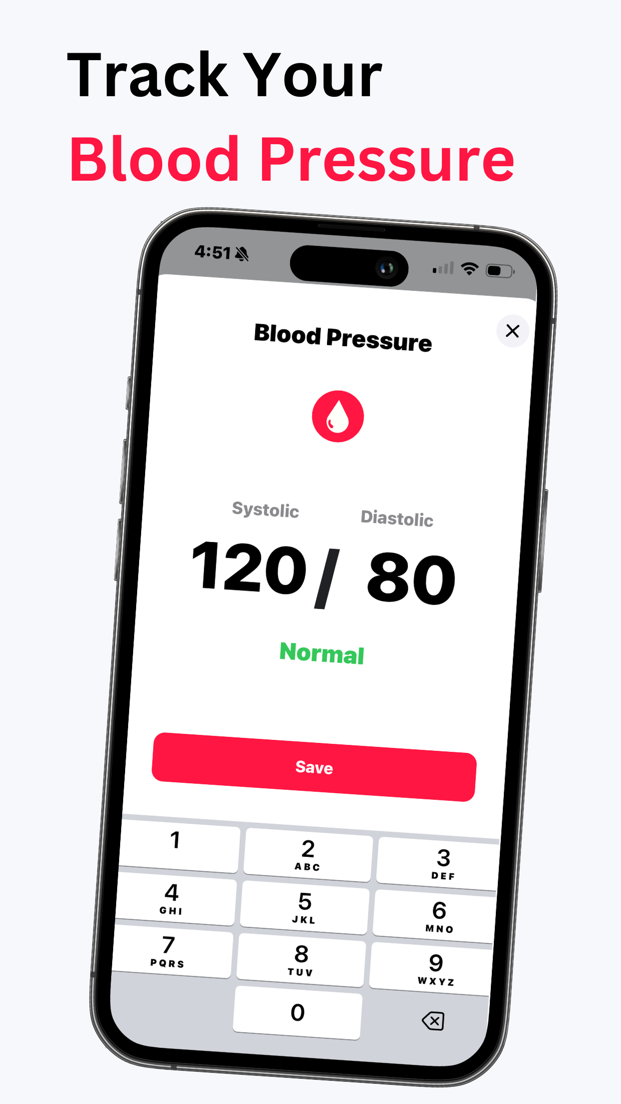
Two-tap logging
Enter systolic and diastolic, tap Save. Pulse is captured from your last camera reading. Add notes like “after coffee” or “before meds”.
Trends over time
See averages by week and month, morning versus evening, and whether your lifestyle changes or medication are moving the needle.
Standard categories
Every reading you log is labeled with its standard category (Low, Normal, Elevated, Stage 1, Stage 2 or Crisis) and a plain explanation of what each range means.
Reminders that stick
Schedule morning and evening readings. Consistent timing is the single biggest factor in useful blood pressure data.
Apple Health sync
Write readings to Apple Health and read ones from Bluetooth cuffs that already sync there.
Blood pressure breathing
A guided slow-breathing program designed to help you relax before a reading, with calm soundscapes.
What the camera can and cannot tell you
Some apps claim to “measure” blood pressure with a camera. Pulse Tracker does not. After you calibrate the app with a real cuff reading, it uses the shape and timing of your pulse wave to show an estimated blood pressure between cuff readings. It is clearly labeled, it expires and asks for recalibration, and it exists to help you notice a trend worth checking with your cuff, not to replace it.
- Cuff readings are always the source of truth
- Estimates are labeled and never mixed into your cuff history
- Calibration expires so the estimate can't drift silently
- Any reading in a high or crisis range tells you to confirm with a cuff and seek care

Blood pressure categories at a glance
| Category | Systolic (mmHg) | Diastolic (mmHg) | |
|---|---|---|---|
| Hypotension | below 90 | or | below 60 |
| Normal | below 120 | and | below 80 |
| Elevated | 120 to 129 | and | below 80 |
| Hypertension stage 1 | 130 to 139 | or | 80 to 89 |
| Hypertension stage 2 | 140 or higher | or | 90 or higher |
| Hypertensive crisis | higher than 180 | and/or | higher than 120 |
Based on the American Heart Association categories. A crisis reading needs immediate medical attention. Read the full blood pressure chart guide.
Blood pressure app FAQ
Can the iPhone measure blood pressure without a cuff?
Not reliably, and no app should claim otherwise. There is no sensor in an iPhone that measures the pressure in your arteries. Pulse Tracker is a blood pressure monitor app in the sense that it records, classifies and tracks readings from your home cuff. After you calibrate with a cuff reading, it can also show an estimate derived from your pulse wave, but it is labeled as an estimate and should never replace a cuff.
How do I log a blood pressure reading?
Open the Blood Pressure card, type your systolic and diastolic numbers from your cuff and tap Save. The app immediately classifies the reading and adds it to your history and trend chart.
What do Normal, Elevated and Hypertension stage 1 and 2 mean?
They are standard categories based on your systolic and diastolic values. See the full breakdown in our blood pressure chart. Readings below 90/60 are labeled Low.
Does it sync blood pressure to Apple Health?
Yes. Readings you log can be written to Apple Health as systolic and diastolic blood pressure, and readings from other connected devices can be read from Apple Health.
Can I share my blood pressure history with my doctor?
Yes. You can export a summary of your readings and trends, and the history view is designed to be shown or shared at appointments.
Is the blood pressure log free?
Logging and basic classification are free. Premium adds trend analysis, insights and the estimated reading.
Start your blood pressure journal
Free to download. Log your first reading in seconds and see your trend build from day one.
Download for iPhoneRequires iOS 17 or later · ★ 4.7 rating · Available in 8 languages
Wellness disclaimer. Pulse Tracker is intended for general wellness use only. It is not a medical device, is not FDA cleared or approved, and is not intended to diagnose, treat, cure or prevent any disease or condition. Blood pressure shown in the app is either a value you entered from your own cuff or an estimate derived from the pulse signal after cuff calibration; it is not a measurement and must not be used to make medical decisions. Read the full wellness disclaimer. Camera readings, estimates and classifications are for general information only and can be affected by movement, lighting, skin temperature and other factors. Do not use them to diagnose, treat or make decisions about a medical condition. Always consult a qualified healthcare professional, and call emergency services if you have chest pain, shortness of breath, fainting or other urgent symptoms.