How to Measure Heart Rate on iPhone (With or Without an Apple Watch)
The iPhone has no heart rate sensor, but it has something nearly as good: a camera and a flash sitting side by side. That is enough to read your pulse optically in about 30 seconds. Here are the three ways to check your heart rate with an iPhone, from easiest to most equipment-heavy.
Method 1: Use the camera with a heart rate monitor app
This is the fastest way and it works on every iPhone running iOS 17 or later.
- Download a camera heart rate app. Install Pulse Tracker from the App Store. It is free and needs no account.
- Sit down and relax. Sit quietly for a couple of minutes with your hand resting on a table.
- Cover the rear camera and flash. Place the pad of your index finger gently over the lens and flash together. Light pressure only.
- Tap Measure and hold still. Breathe normally and keep your hand still for about 30 seconds while the pulse wave draws on screen.
- Read and save your result. See your BPM plus respiratory rate, HRV, stress and energy. Save it so the app can build your trend.
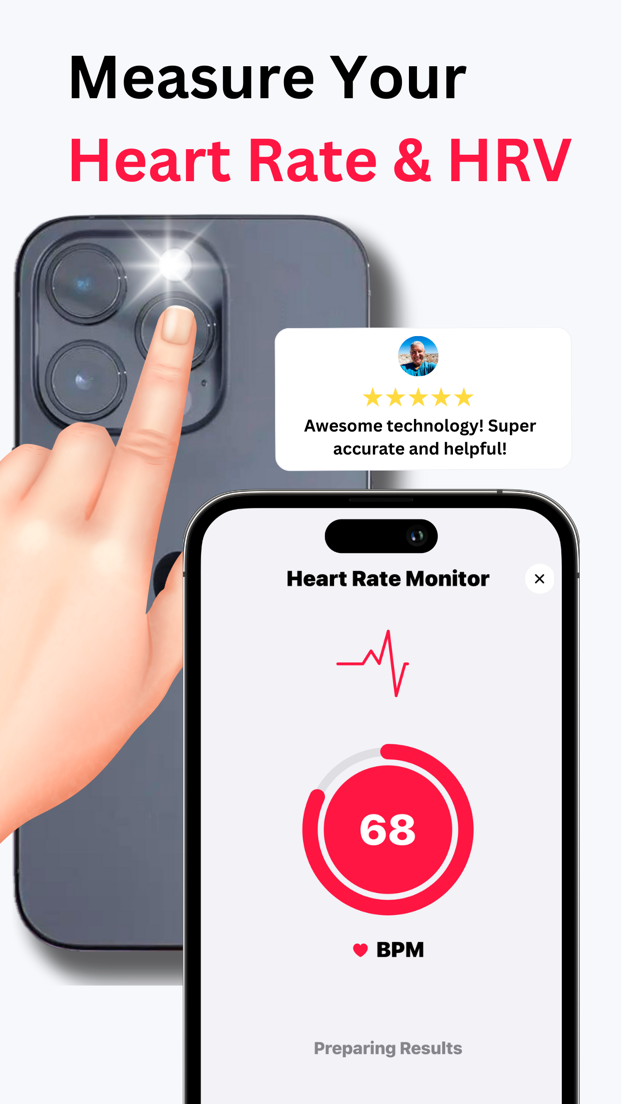
Tips for an accurate camera reading
- Warm your hands first if they are cold; blood flow in the fingertip is the signal.
- Don't press hard. Pressing squeezes blood out of the fingertip and flattens the pulse wave.
- Avoid direct sunlight on the lens.
- Stay still and don't talk; talking changes your breathing and your heart rate.
- Measure at the same time daily, ideally in the morning, for a comparable trend.

Method 2: Count your pulse manually
No app needed, just your iPhone's clock or stopwatch.
- Turn your hand palm up. Place your index and middle fingers on the thumb side of your wrist, just below the base of the thumb.
- Press lightly until you feel the pulse.
- Start the stopwatch and count beats for 30 seconds.
- Double the count for beats per minute.
Manual counting is accurate for heart rate but gives you nothing else, no HRV, no history and no trend.
Method 3: Apple Watch
If you own an Apple Watch, it measures heart rate continuously using green LED photoplethysmography and shows it in the Heart Rate app and the Health app on your iPhone. It is excellent for all-day and workout tracking. Its limitations are cost, charging, and that it does not give you a blood pressure journal or an on-demand stress and energy reading in context. Many people use both: the watch for continuous data, and a camera app for a deliberate morning resting measurement, HRV and blood pressure logging.
What is a normal result?
For adults at rest, 60 to 100 BPM. Fit people are often in the 50s. See the full resting heart rate chart by age, and read what your HRV number means.
Related: Heart rate monitor app · Compare heart rate apps
Wellness disclaimer. Pulse Tracker is intended for general wellness use only. It is not a medical device, is not FDA cleared or approved, and is not intended to diagnose, treat, cure or prevent any disease or condition. Blood pressure shown in the app is either a value you entered from your own cuff or an estimate derived from the pulse signal after cuff calibration; it is not a measurement and must not be used to make medical decisions. Read the full wellness disclaimer. Camera readings, estimates and classifications are for general information only and can be affected by movement, lighting, skin temperature and other factors. Do not use them to diagnose, treat or make decisions about a medical condition. Always consult a qualified healthcare professional, and call emergency services if you have chest pain, shortness of breath, fainting or other urgent symptoms.
FAQ
Can I measure heart rate on iPhone without an app?
Only manually: count your pulse at the wrist for 30 seconds and double it. The iPhone has no built-in heart rate sensor; the Health app displays data from an Apple Watch or a third-party app.
Does the iPhone Health app measure heart rate?
No. It stores and displays heart rate from other sources such as Apple Watch, Bluetooth chest straps or camera-based apps like Pulse Tracker, which can write to Apple Health.
Is the camera method safe?
Yes. The flash produces light, not radiation beyond visible light. The lens area can get warm during a long measurement; that is normal.
Why does my reading seem too high or low?
Movement, pressing too hard, cold fingers, bright sunlight or having just walked are the usual culprits. Sit for a few minutes and measure again. Check the Measurement Quality score.
Measure your heart rate on iPhone now
Download Pulse Tracker free and take your first reading in 30 seconds.
Download for iPhoneRequires iOS 17 or later · ★ 4.7 rating · Available in 8 languages